
Resizing your World Frame

Prime8 — Thu, 05/07/2009 - 13:13
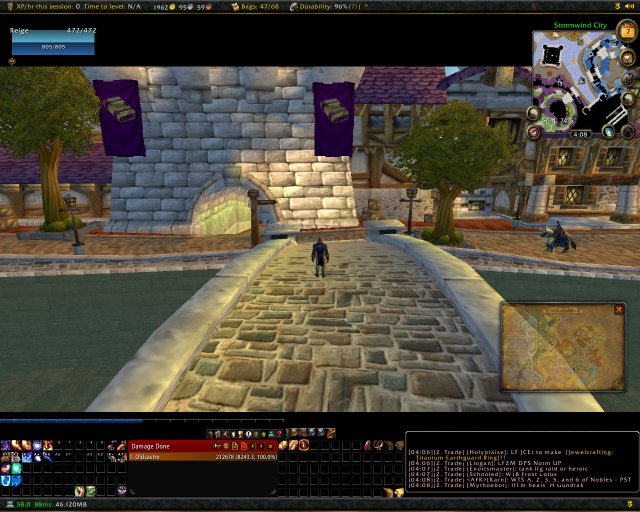
I've been trying to find a way to resize my game window. I noticed that a lot of the dashboard style UI mods just sit over your window, which means you're actually unable to see anything under the frames. CT_Viewport appears to be broken, and I haven't been able to get skinner or the other viewport alternatives working. I came across these macros though:
/run WorldFrame:SetUserPlaced(true) WorldFrame:ClearAllPoints() WorldFrame:SetPoint("TOPLEFT",0,-100) WorldFrame:SetPoint("BOTTOMRIGHT",0,100)Reset to default:
/run WorldFrame:SetUserPlaced(false) WorldFrame:ClearAllPoints() WorldFrame:SetPoint("TOPLEFT",0,-0) WorldFrame:SetPoint("BOTTOMRIGHT",0,0)
Unmodified, that first macro will create a black bar at the top and bottom of your screen (the second macro just restores the world frame -window the game is rendered in- to default). The game will resize to fit between these bars (giving you a widescreen look), but allow you to place your addons inside these black bars.I'm going to be messing with it a bit more, but here's what I've initially got.


Recent comments
7 hours 17 min ago
4 weeks 1 day ago
7 weeks 1 day ago
7 weeks 2 days ago
9 weeks 1 day ago
9 weeks 1 day ago
9 weeks 1 day ago
10 weeks 2 days ago
11 weeks 3 days ago
13 weeks 17 hours ago