
Shihli's UI v3.0

Shihli — Sat, 10/18/2008 - 21:25
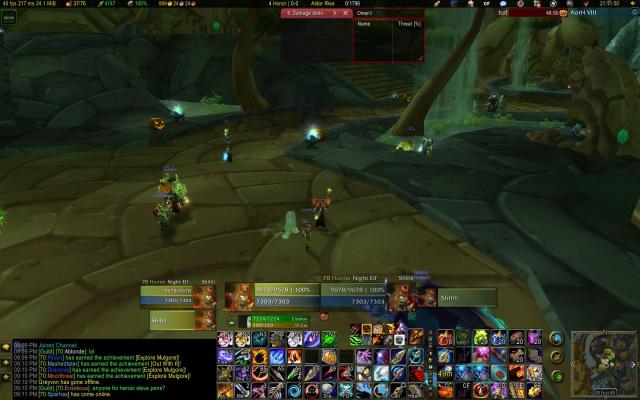
This is my UI as of 10-18-08.
Highlights:
1) Pitbull - new UI frames. My toon's in the lower center, off to the left ... my target, directly to its right. Target's target, right of that. Focus frames are to the left of my main toon frame, and focus target's target below that. Pet frame just below mine, with pet's target just right of that (not shown).
2) Prat - chat mods.
3) Grid - yes, I'm using it now. Haven't touched it much though.
4) Fubar - across the top.
5) Violation, Omen - top and center.
6) ElkBuffBars - Upper-right.
7) Bartender4 - across the bottom, hogging up like 20% of my screen (and yes, hunters DO need that many buttons).
8) Simpleminimap - lower right.


Some things I'm noticing that
Dragon — Sun, 10/19/2008 - 07:44Some things I'm noticing that might allow you to free up space.
#1, Enchanting, Cooking, Engineering, Mounts. First Aid, Disenchant
Personally I have all of these on Shift+2 (your 2nd action bar). This allows you to only change to them when you need them, as I highly doubt that you need to have them showing at all times.
#2 Aspect of the Beast, Aspect of the Cheetah
I honestly forget the last time I ever used Aspect of the Beast on my hunter if I ever did and once you get Aspect of the Pack you really don't NEED to use Aspect of the Cheetah ever again. Same thing applies to Eyes of the Beast and Eagle Eye. Both of these tend to go on a seperate action bar.
Finally do you realize you have fishing on your bars twice?
With regards to Pitbull, have you considered narrowing the frames a little and instead of clumping them up kinda spreading your bars more horizontally out on the screen?
Just some tips take them for what you will.