
Ret UI 3.3 (patch, attempt)

Dragon — Mon, 12/22/2008 - 12:45
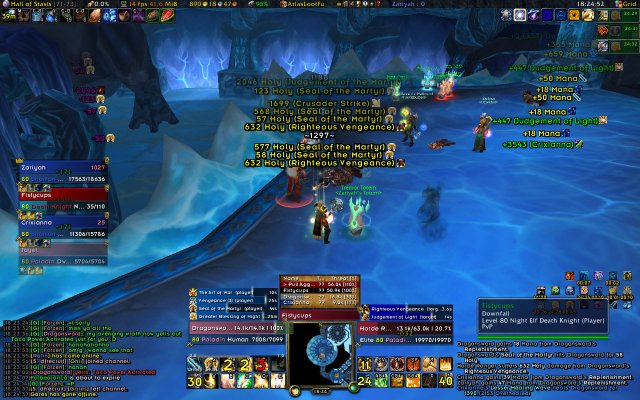
One thing that is not shown is omgwtf grid. I don't turn it on in parties or solo but it is commonly found right where the party is located right now (as I turn parties off in raid).
I might use bartender to add another bar under the minimap for quest items (since autobar hates quest items even though it had a thingy for them) and Everyman for Himself just so I can see their CDs.
BTW, when making a UI if you are anal-retentive or OCD, get the mod Align. Just tap /align and it overlays something like graph paper over your screen.


if you want to clean it up
Keisjaa — Mon, 12/22/2008 - 13:04if you want to clean it up just a smidge:
Either increase the grouping distance on party, or have buffs/debuffs on top right(so the don't overlap the nex frame)
In classtimer you can got o bar options & delete the section under text where it says (%u) since you know who the timer bar is for
back ground of omen can be made to look more like the restof your UI(unless you like the ugly ass parchment)
not sure if it matters to you but you could bump the classtimer bars up a little & put the player/target name above the unitframe(cause some of the units names are stupidly long)
if you need to move minimap buttons around(you could cluster them all under your minimap or under your bars) i recommend www.wowinterface.com/downloads/info5367-DetachedMiniMapButtons.html it lets you drag all the buttons anywhere you want & lock em all
Just throwning it out there
The minimap buttons I don't
Dragon — Mon, 12/22/2008 - 13:18The minimap buttons I don't mind since there are only 2 (autobar and bugsack and currently autobar refuses to let me use /commands to open it.)
Thanks for the Classtimer tip though I have been wanting to get rid of those for awhile.
With omen I still don't know what I wanna do with it. Part of me likes the parchment as it jumps out, then again with where it is posititioned I suppose blending it in might work.
The other things I have thought about doing with pitbull is just reducing the size of the font.
All tips are lovely though and give me more things to dink around with.
Try a mod called CowTip, its
Vulk — Mon, 12/22/2008 - 12:53Try a mod called CowTip, its for tool tips. It makes it movable, you can customide size and configure it so much that it can show the guild rank of your target, even horde targets lol. Its awesome and would make your ui look that much better.
I love cow tip..not just for
Aidin — Mon, 12/22/2008 - 15:36I love cow tip..not just for the info...but I can move the damn window whereever I want it!
I think I remember using it
Dragon — Mon, 12/22/2008 - 12:59I think I remember using it before. If I recall when used on players it also shows you there health and mana. I might give it a shot again soon, depends im giving this a little bit more time to work with. Then I'll figure out what all I need to add.
Gives more than that, like
saedo — Mon, 12/22/2008 - 13:25Gives more than that, like range, class, spec, threat, target, etc.
Oh and uh. Player Casting bar
Dragon — Mon, 12/22/2008 - 12:50Oh and uh.
Player Casting bar is located right under my Unit Frame just like target is located under my target's unit frame.
My focus frame is nuzzled right up in the corner between pally power and my auras.