
Help me with my UI

moriella — Thu, 03/19/2009 - 03:12
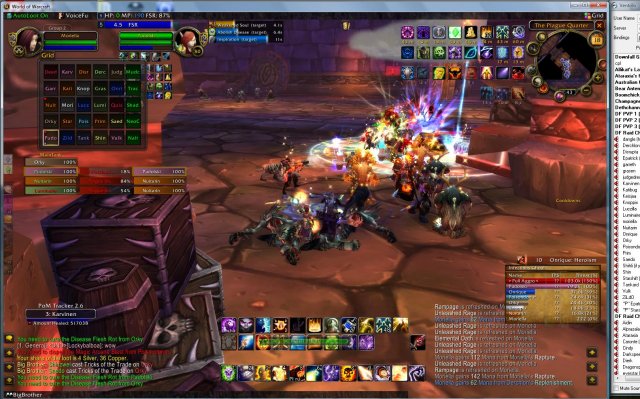 my ui - piss poorOk, lets try this. I'm terrible at actually integrating all my adds and making great looking displays like I've seen so many of you with. Does anyone want to take me step by step on vent and help me organize this mess. It works this way and I've been using it like this for a long time - but in the interest of cleaning it up - I'd like to go further. I might even be able to squeak out a bit more efficiency


testing comment post
garrethtest (not verified) — Thu, 03/26/2009 - 23:39testing comment post permissions
testing.
garrethtest (not verified) — Thu, 03/26/2009 - 18:01testing.
update, ui still ugly but in progress
moriella — Fri, 03/20/2009 - 22:11here is the link to the newer pic
/node/5818
Do you have an updated pic of
Atar — Fri, 03/20/2009 - 11:17Do you have an updated pic of your UI Mori? I'd like to see what progress you're making with it! :)
later today
moriella — Fri, 03/20/2009 - 11:29I had to finish a project yesterday. I hope to work more on it later today and will post a new pic soon.
Thanks for all the great input and ideas so far :)
g_UI-4.9 with explanation: A
garreth — Thu, 03/19/2009 - 12:43A quick explanation of what's going on in here, since multiple people have asked recently.
I suggest: SBF (Satrina
saedo — Thu, 03/19/2009 - 11:53I suggest:
If pitbull is too confusing,
Aidin — Thu, 03/19/2009 - 09:16If pitbull is too confusing, try agunitframes.
Do you LIKE your grid way up there??? That would drive me nutz. I personally prefer my grid, player window, target & target of target window in the center so i can see things going on around my feet.
If you're trying to put
Deje — Thu, 03/19/2009 - 08:27If you're trying to put together an awesome UI from the ground up, you want to take it one step at a time or you'll be overwhelmed with a mess of clutter and confusion that you won't even know where to start.
My current UI was pulled from a prepackaged UI I found online, but I'll post a link anyway just to give you an example of my prefered placement of elements.Most of my raid elements aren't shown there, but I keep my MT frames above the chat window (replacing questhelper) and everything else that is necessary off to the side, out of the way.
If you want my advice for starting from the ground up, you might want to try this:
1. Turn off all of your aesthetic UI mods except for one at first. I'm going to suggest you start with your Bar frames, because they're going to be the foundation for the rest of your UI to build on.
2. Log in with just your Bar mod turned on, and set them up to your desire, wherever you'd like them to be and however you'd like them to look. If you notice in my screenshot, there are only 3 main bars showing, the same as you've got.
The bottom bar is where I keep most of my main combat spells; attacks and the like. Above that I've got a slightly smaller bar (I find different size bars extremely useful as they help me differentiate and organize my spells based on different combat uses) which is where I keep my "secondary" combat spells and attacks that are necessary for different forms of combat (in the case of Fartblast, I keep AOE up there. On Deje, that's where I keep my most-used totems).
The third bar is my "wildcard" actionbar. I have Bartender set to switch that bar out with another, based on whatever modifier I have held down at the time. No modifier held down, I've got combat cooldowns/runic power dumps, consumables, and my mount/noncom pet of choice. If I hold down Shift, the bar is replaced with another, where I keep various extra consumables on hand as well as a few other spells that I couldn't find enough use to fit into my main bars. Holding down CTRL, and i've got a half-empty bar that I use for dumping random odds and ends into (such as quest items you need to use from the bags and cosmetic items like Dartol's rod or Nogg), holding down ALT brings up a bar full of various macros that I keep on hand. That's 4 bars worth of clutter condensed into one.
You get the idea, right? Set up your bars to your own liking, but keep in mind the versatility options at hand. Simple things like different sized bars can make browsing your own spells (if you forget a keybind or need to click) a lot easier, and less of an eyestrain.
3. Okay, you've got your bars set up, now log out and turn on the next most important mod you've got. I noticed you're using the default Blizzard unit frames, which just adds to the clutter of your UI (and they don't play along very well either, from my experience). You might want to consider getting something like Pitbull and setting up your own unit frames. I suggest Pitbull because it's more lightweight in memory than xPerl and far more versatile than AG_UF. You can expect to spend at least an hour or two just shaping up your unit frames, but once you get the hang of it you'll be golden.
I tend to keep my unit frames right in the center of my screen so that I've always got a close eye on my own health, but it's up to you where you put yours. Since you use Grid, you can just disable the party and raid modules and just keep Player/Target/TargetTarget/Focus/FocusTarget or whatever you like there.
4. After your unit frames are set, log out once more and turn on Grid, as well as all of your necessary Raid mods. While you're at it, download Nshakedown and install it if you haven't got it already. It takes all of your mods and test runs them at once so that you can organize them all at the same time with a few clicks and drags. The last thing you should do is wait until you're raiding to set these up, so queue up for AV. Since AV has gone to the shits, it has become prime real estate for setting up Raid mods. Start by setting up Grid. Play around with all of the options and functions, since you'll always have to be staring at it anyway. You'd be surprised at how good you can make Grid look with some tweaks. After Grid's set up, fire up NShakedown and organize all of the raid mods to your liking, out of the way but still accessable. As you're organizing them, consider which mods you'll actually need to see while raiding and which you can just shove in a corner. Example: As a healer, you probably won't be following main tank targets very often, so move it somewhere that's out of your way.
5. Once your raid frames are set up, you're ready to log out once more and flip the switch on all the rest of your mods. What I'm seeing in your UI that stands out the most is Fubar. You don't need to have Fubar and all of its buttons showing at all times, if ever. Yes, it's a very useful mod, but it's still just as useful when it is hidden at the top or bottom and only appears on mouseover. In its generic state, it creates a miniature "frame" around your WoW game that takes away from the game itself.
With all of that being said, follow this golden rule to a good looking UI:
If you don't need it visible at all times, hide it!
It's still there, you just don't have to stare at it all day. Try to seperate your interface mods between necessities (bars, unit frames, grid, chat, buffs and raid mods) and aesthetics/perks (minimap, bags, etc) and go from there. If you're trying to get the best looking interface with good functionality, I'd consider downloading a couple mods to replace what you currently still have as default. For you, that's buff frames and the minimap. I use SatrinaBuffFrames and Chinchilla, and they both work great for what I want in a UI.
Hopefully this little guide helps.
pitbull
moriella — Thu, 03/19/2009 - 08:32Ok, I added quartz, I like that :)
I tried pitbull before, it confused the hell out of me. Going thru everything it takes to set it up was more than I could deal with at the time. Would be great if there was a user manual for it that explained it in detail.
As far as memory, I've got 8g. Thats not really a concern
I'll try backing everything out and basically 'starting from scratch' as you suggested. I didnt realize bartended could hide or show a bar with a shirt or control, thats pretty nice. But as I have shift and control bound to lots of spells for clique, it may not work so well. I'll take a look at it
What makes bartender even
Felsteel — Thu, 03/19/2009 - 09:23What makes bartender even better is the option to customize your keybinds in such an easy way. what i did was put my buttons in the order i was comfy with, went to the keybind option for bartender and then set up my keybinds just by scrolling over the button and pressing the key you want to bind it too, if you mess up highlight it and press escape, will clear all the binds on that button out.
You could also trim the amount of slots a bar has and how visable the bar is i have all my mounts and prof on a hidden bar that only is seen if i scroll over it and its only a 6 button 2x3 bar.
bar visibility
moriella — Thu, 03/19/2009 - 09:30I have several things set for very low opacity. Note my bags and the left hand vertical bar
I've often thought about my grid position. It's just there cause it's always been there and I'm pretty comfortable with it. I've thought about moving it, just dont know how to really arrange it.
I've got soo much screen realestate running at 1680x1050 that it does seem a little 'out of the way' now. I'm on a 24" widescreen and it's a pretty good distance for my eyes/mouse to travel sometimes
If you use those modifiers
Deje — Thu, 03/19/2009 - 08:47If you use those modifiers for clique, you shouldn't have too much problem integrating both mods. I use clique on Deje, and since all of the bindings are modifier+mouse buttons, they rarely interfere with that extra bar.
If you're going to legitimately start from scratch, you might want to go ahead and delete your WTF folder. You don't have to do this, but It makes for a cleaner process in the end as it won't have any of your outdated variables to fudge your work up with. Keep in mind that if you do delete your WTF folder, you'll lose your clique/actionbar bindings, so write them down and be cautious.
And yeah, pitbull is a tough shell to crack at first. It's a lot of unnecessary navigating to make minor changes to the frames. Since you've got the ram, you might have some luck with xPerl instead. Alternatively, there's always AG_unitframes. I believe both of them have available "presets" you can download so that you can try different frames without doing an assload of work in between.
You could just pull your WTF
Katibug — Thu, 03/19/2009 - 09:45You could just pull your WTF folder out and put it on your desktop. Blizz will replace it with an empty one. I do that when I'm rebuilding my UI so everything isn't completely lost.
^ good point
Deje — Thu, 03/19/2009 - 10:07^ good point
My initial question would be,
Fjork — Thu, 03/19/2009 - 07:32My initial question would be, have you tried Dominoes? It lets you click-drag each line of your action where-ever you want, and extends to include your cast bar, your pet bar, your auras, etc. It also gives you (I believe) ten total action bars.
Finally (and most importantly) you can resize your action bars however and where-ever you want. Horizontal? Sure. Vertical? Sure.
I have one action bar with only four buttons on it for mana potions, health potions, haste potions, and bandages.
I have one 'box' of action bars with all of my Shadow and Discipline Spell, one 'box' with all of my Holy spells, and one 'box' of action bars with all of my macro'd self-help spells (/cast Dispel (target=player) yada yada).
Other than that, I'll leave it to the think-tankers like Saedo and Ghli. :-)
Except TrinketMenu. As a Shadowpriest TrinketMenu was invaluable to me as I usually had three to six trinkets on cooldown from fight to fight. After you use a trinket (aka: during trash/quick boss-fights), you just tell it which trinket comes next and as soon as you are out of combat it will switch to the new trinket. Not to mention you can move it anywhere you want on the map and it will automatically 'show' the trinket that is currently equipped so you can click it.
thanks
moriella — Thu, 03/19/2009 - 07:41I'll look into dominoes - the darn blizz cast bar is important to me, but has always been a thorn in my side. It moves location from time to time - thus the empty space in my cast bars - as you can see, it doesnt always appear in that space I made for it.
Trinkets - well, I just dont swap them anymore . I dont have any 'on use' trinks in WOTLK. They are all proc trinks now, and really have no need to swap them per fight.
Have you tried Quartz? It's
Atar — Thu, 03/19/2009 - 07:56Have you tried Quartz? It's THE only cast bar to use IMO.
yes windowed
moriella — Thu, 03/19/2009 - 04:35Before anyone asks - yes I play in windowed mode. I have the horsepower to do that