Sargus UI, Any tips?

Sargus — Thu, 10/29/2009 - 13:16
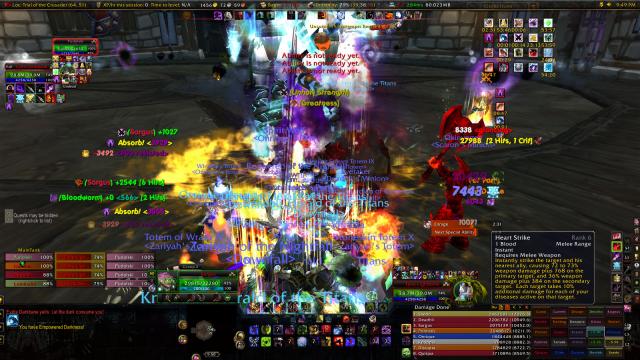
My UI, also looking for any tips or changes that would make it a better ui.
Groups:

Sargus — Thu, 10/29/2009 - 13:16
My UI, also looking for any tips or changes that would make it a better ui.


Also a tip for any one that
saedo — Fri, 10/30/2009 - 10:45Also a tip for any one that uses mods. After you set it up, you can turn off the Options module of it (if it exists). This usually saves you 2-3 MB per mod.
Like for me, MBST Options, off. SBF Options, off. Carousel Options, off. Like that.
This is also why I only give vague info if you ask me to set up these mods cause I can't get into options and have to do it from my terrible memory. ;p
Dump your action bars unless
Agoney — Fri, 10/30/2009 - 06:22Dump your action bars unless you really really need them.. Everything is bound, no need to show em.
Is that titan panel? Dump it, get fubar, and auto-hide it.
Recount can be a hog.. disable during combat if it helps.
Bad Ag! You're so behind the
saedo — Fri, 10/30/2009 - 10:28Bad Ag! You're so behind the times now. The mantra nowadays is dump Fubar for TitanPanel (or any other LDB based mods)
Hahaha, for realz? What's LDB
Agoney — Tue, 11/03/2009 - 11:00Hahaha, for realz? What's LDB :|
Ahh, okay.. I get it. I'll
Agoney — Wed, 11/04/2009 - 07:07Ahh, okay.. I get it. I'll swap out some of those addons then!
http://forums.wowace.com/show
Ghli — Tue, 11/03/2009 - 11:26http://forums.wowace.com/showthread.php?t=14903
In short, a LDB enabled addon has 2 parts. The first part is mostly what we have been using like bclockfu(displays the current time on fubar), moneyfu(dispalys the currency on your current character and the rest of your characters on the same server), ora2(shortcut to ora2's options), etc. The second part is the display part of the addon or shortcut to the options of the addon. LDB makes it so that you don't have to have fubar installed and use only fubar compatable addons only, or titanbar and titanbar addons only, etc. You can choose whatever addons that are based on LBD(or broker for short) and display them on a LDB-compatiable display addon(like chocolatebar, titanpanel, or docking station if you want something like fubar). A partial list of the addons are at http://wiki.github.com/tekkub/libdatabroker-1-1/addons-using-ldb
From the master of getting more FPS (pre WoW-Cube days)
Dragon — Fri, 10/30/2009 - 05:52Ok, first recomendation. Ask garreth and your parents really really nicely and get a WoW-Cube for christmas. Do all the dishes you never do, and mow the lawn you never mow. Great investment at $600 and the thing will last you awhile.
Now lets get your PC to eek out more fps now while you wait on that lovely piece of hardware.
#1. MSBT is lovely, but lets set it up so that at most it shows your damage and procs. The more numbers you have travelling on your screen, the worse it is for your fps. You don't NEED to see your dot ticks, so lets just get down to direct damage and procs you need to watch now.
#2. Dump recount - You don't need to check your damage in raid, check parses after raid instead of recount during it. Frees up Mem usage and you're less worried about topping meters.
#3. Going with #2, where the f*** is Omen? Get omen back, dump recount. Move omen to where recount is. Make it your goal to always be on the takes ass on recount but not to pass them. It's a fun game I promise. See there are points for second place.
#4. Turn all the quest mods off before raid. But to go with that why are you still also using the WOW standard quest tracker. You can find this hidden inside your Chocolate/Carousel w/e.
#5. This goes back to #1. Go into your interface options and turn off all nameplates. Once again these are more things that your computer needs to generate during a fight graphically that you don't need. Or at least minimize it so that it does not show titles or guilds. Or pets either because what are you going to do in order to save shadow anyway?
#6. Already has been said already but move your buffs into the Upper Right hand corner just cause they are frustrating me.
#7. Honest question how many action bars do you actually look at during combat. In BT4 there is an option so that bars only show up when you mouseover them. It's something I would suggest that you consider for just more screen real estate.
#8. Lets go ahead and turn off the xp tracking mod on whatever it is on your Chocolate/Carousel. You're 80, I hope you're not still gaining xp :P
#9. Also remember that you can set mods up for each toon you have, re: #8. This makes it so that the xp mod will only show up on your alts that you are still leveling.
Anyway that's all I can think of right now, give it a try and let me know how it works.
Oh and did I mention that you should beg your parents to get you a wow-cube for christmas? It's awesome.
Edit #10. (Ty Elasped) Turn off Pallypower man :)
love the use of your x-perl,
Elapsed — Thu, 10/29/2009 - 16:45love the use of your x-perl, but why is PallyPower on? I see the dot in the MT frames!
but other than that fix your buffs man, thats a mess
also not sure how much memory Titanpanel still takes up now and days but I switched to Chocolatebar and couldn't be more happy with the change and the change in memory use from FuBar
FUCKING TURN OFF BULLSHIT
garreth — Thu, 10/29/2009 - 13:49FUCKING TURN OFF BULLSHIT QUESTING, MAP, FROO-FROO MODS IN RAID.
GODDAMIT.
You do good damage at 6fps. You will do BETTER damage at 30fps. Be better.
but but..he's just a
Kwondre — Fri, 10/30/2009 - 04:32but but..he's just a kid!
reporting garreth for child abuse!!
Turn your tooltips off in
saedo — Thu, 10/29/2009 - 13:23Turn your tooltips off in combat you clicker!
Hmm 6 fps and 80MB of memory. Sounds overbloated, though maybe a chunk of that is recount.
Probably could turn off that quest mod or something on the left hand side. And are you the one that still runs auctioneer in raids? Turn that off via ACP imo, or if you do log off, turn off Stubby (lib), that'll take out all the auctioneer mods in one go (common dependency).
What's the real estate on the top right corner? It's all empty and your buffs/debuffs are lined up as if a minimap is still there but it's not. Looks like you use SBF, so move them over to the right or something.
Thanks saedo! i didnt know
Sargus — Thu, 10/29/2009 - 13:53Thanks saedo! i didnt know you could turn tooltips off, i thought i turned auctioneer off, but i guess i was wrong
ACP is downloaded and it is great, thanks for the advice