
Saedo's UI 3.1.1

saedo — Fri, 07/24/2009 - 00:20
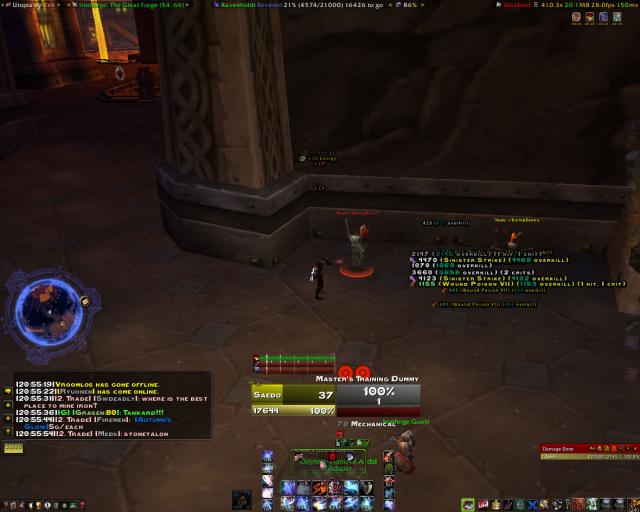
Well I spent the night tweaking the ever so hell out of the UI.
Changes from last version is basically:
- Ditching Fubar for Carousel, and subsequently switching to LDB equiv mods.
- Using Pitbull 4.0. Messed with it and just gonna use that as the energy/combo watcher too so got to ditched Nugs/IceHud
- Auracle got reduced in capacity for Utopia (to the right of the target box). It's better at figuring out debuffs than what I tried to do manually.
- Bartender buttons got streamlined. Added more fade away bars and scaled a few down.
- That's about it, cept a few positional changes on various mods.
Questions? Comments? Suggestions?


A few more tweaks. Changed
saedo — Sat, 07/25/2009 - 21:18A few more tweaks.
Well that's the "major" thing for this release. Right now on my player frame you'll see my
For the target frame:
This did force me to push down the buff/debuff frames, so they're just below that, gave them each their own row, but only 12 icons each. Should be good enough, Utopia handles the important raid debuffs. Pitbull will only really be used in solo'ing non-raid to see some those debuffs.
Questions? Suggestion? Comments?
Saedo, set things like your
garreth — Sun, 07/26/2009 - 02:00Saedo, set things like your menu bar and bag bar and, hell, even your action bars to be visible only on mouseover in bartender4. You're going for super minimalistic, might as well go all the way.
Well the actionbars should
saedo — Sun, 07/26/2009 - 09:49Well the actionbars should stay cause they double as CD monitors. The left and middle ones at least. The right one (pots and all) could go I suppose, but things won't look as symmetrical. lol I did want it more minimal, but still informational. Utopia kinda screws true minimalistic since it excessive and shows buffs I personally don't care about, but the raid might. ;p
Guess the menu and bag bars can go. Though wonder if the Outfitter bar will look all lonely by itself over there. lol
Ah there's one trick I did with bartender you all won't see. First, I turned off stealth paging in my main action bar. So when I stealth the same buttons remain. I set up another bar which has all my stealth abilities on it, another 4-5 button action bar, which only shows up when stealthed. It'll appear slightly above my stealth button. This way, I have the exact same access to all my abilties during stealth, with stealth only abilities being the addtional optional ones.
Talk to me about Carousel vs
garreth — Fri, 07/24/2009 - 19:04Talk to me about Carousel vs Fubar. Will old Fubar addons work in Carousel with a LibDataBroker (Fubar2DataBroker or whatever)? How does Utopia work?
Yes Fubar addons will work
saedo — Fri, 07/24/2009 - 19:33Yes Fubar addons will work with it using the Fubar2Broker addon. Though a lot of addons nowadays (that aren't Fubar plugins themselves) are dropping Fubar support and going LDB anyways, there's really less use for it. For those Fubar specific plugins, plenty of alternative equivalents.
Carousel itself is one of many "bar mods" that's LDB based. There's Chocolate, StatBlocks, TitanPanel, NinjaPanel, etc. Some are straight up bars like Fubar is, some have special flavors to them. (edit: Remember how we would go eww TitanPanel is 3 years old, go get Fubar? apparently we're full of bad info and going TitanPanel is going LDB, wave of the future!)
Carousel is one that firstly, breaks it into blocks, the blocks are independent and you can move them anywhere. You'll see 4 on my screen. Top left, top right, top middle, and there's one just below the top left one.
Each block can be extended into multiple blocks, attaching a lot of them together gets you that long bar if you so choose. I have 2 such attachments, the middle one and the top right one. Those each have 2 blocks that are "stuck" together permanently.
Another trick Carousel has is that it allows you to combine several "feeds" into a single block and you can cycle through them. See those tiny arrows to the side of some of my blocks? The 2 left ones, and the right half of the middle one. Clicking those arrows will cycle through the different feeds I've attached to them.
Take for example the left one you see BugSack in it (edit: oops in the new screenshot it's omen up there). I actually put all my option buttons in there, Grid, Bartender, Pitbull, Ora2, etc. I'd have to click on the arrows to get to the one I want.
It is slower than direct access, but since I don't really go into them often, this keeps them tucked away. And if I do wind up using one a lot, I can always move it up front for the night, like have Ora2 always up.
Utopia does the whole scan the raid for talents, see what's available, and shows the equivalent debuffs on target to see if it's active.
You'll see there's only 4 possible debuffs I can do personally. The "sunder armor" debuff (expose armor for me), the "mortal strike" debuff (wound poison), Savage Combat debuff, and Cast Slow debuff. Bright red if it's off, colored if it's on.
And you see the border, Green if you're all good and everything's up (it doesn't care about Cast Slow atm). Red box if something's missing.
What'd I'd like is a reporting feature, but eh, none of those mods seem to work properly. What it can do is apparently whisper the person in the raid the best debuff they can do but it seems buggy so I try not to mess with that.
You could technically use it too if you're using Clique cast healing now. Target the boss, you'll see the Utopia box, stare at grid to mouseover heal!
Also there was another feature that I tried out but since don't use anymore. It can track debuff uptime. Though it does it in an internal chart, can't really report to raid or anywhere else, was thinking screenshots only possible. And now with WorldofLogs, it can do that, so I just turned that part of it off.
P.S. I also changed the screenie to one with a (partial) raid set up. i.e. grid more filled up and mt and cd windows. Raid warning bars would be starting at my top left corner, ending in middle-ish of the screen for the short timers. Tweaked the pitbull dogtags a bit more.
P.S.S. A couple mods you don't see. Quartz, I have the target casting right above my Combo Points atm.
http://wow.curse.com/downloads/wow-addons/details/ceaphyrels_auto_accept... an Auto Accept invite mod which you can set who to accept. See, this is my secret of instantly accepting invites while afk.
Mmmm. I knew I was ahead of
Prime8 — Sat, 07/25/2009 - 00:24Mmmm. I knew I was ahead of the bar. One eye is closed. Titan Panel is go!
The other eye is open!
That's like saying you were
garreth — Sat, 07/25/2009 - 03:31That's like saying you were ahead of the curve for being a BM hunter in Molten Core in 2005. Hanging on to something when it sucked, only to see it get buffed does not make you a visionary. It makes you lucky someone buffed your shit ;) That said, I don't think I'll ever go back to Titan. Will be fucking with Carousel soon.
Another thing to add is that,
saedo — Sat, 07/25/2009 - 07:50Another thing to add is that, surprisingly, Carousel uses less memory. Fubar was always sitting at about 1.5MB for me. Carousel is about half that at 700KB ish. More customization to looks (prob obvious but each block can be sized, colored, etc differently), ability to roll several feeds into one block (to compact the "bar"), and less memory usage, nerdgasm!