
Trillian

Aidin — Fri, 06/20/2008 - 09:26
Click Here to Download Trillian from download.com
Download the application from the link above.
Once installation is complete follow these steps to set up your IRC connection.
- Click on Trillian > Connections > Manage My Connections
- Cllick Add a New Connection - Protocal will be IRC
- Server Alias is what ever you want to call this...for me it's Downfall
- IRC Line should read: irc.freenode.net
- Nickname: Your IRC Name
- User Name: Blank
- User Info: Blank
- Close to Save.
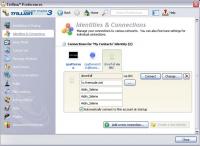 Trillian Setup
Your setup of Trillian is now complete.
In order to connect to IRC each time you will need to follow these steps:
- Go to your buddy list and right click on the white bubble.
- Chose Join Channel
- Enter #Downfall
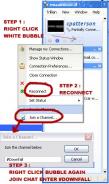 Trillian Connect
You are now connected!!


Recent comments
7 hours 17 min ago
4 weeks 1 day ago
7 weeks 1 day ago
7 weeks 2 days ago
9 weeks 1 day ago
9 weeks 1 day ago
9 weeks 1 day ago
10 weeks 2 days ago
11 weeks 3 days ago
13 weeks 17 hours ago