
WoW Ubuntu 3.1 Guide

Fjork — Sun, 04/19/2009 - 21:03
All suggestions are welcome as this will be an evolving document.
This will be a book page as Garreth, myself, Grasen, Aidin, and Delirium are done tearing it apart (and it will look nicer.)
All information provided has been referenced by the sources referenced through the document and as can be seen I can confirm that they work. These instructions are for Ubuntu 8.10 Intrepid, however they should work fine with Ubuntu 9.04 after release. I might play-test and find out.
Something rarely mentioned by people who support OpenSource is the large amount of End-User work (that’s you) it takes to make a Linux-based system function the way you want it to. If you do not consider yourself at least ‘moderately’ tech-savvy, take a long moment to consider your options before making the conversion to Ubuntu. (aka, if the following words mean nothing to you, Ubuntu isn’t for you unless you have guild/family/friends to help. ‘Mozilla’, ‘Torrent’, ‘manual install’, ‘drivers’, ‘dual-boot’, ‘regedit’, ‘refresh rate’. Not all of them, but if you’re looking at one of the seven than Ubuntu probably isn’t for you.)
*Note* Currently Blizzard does not support Mouse-Hardware properly while using OpenGL. In Windows when your system lags, your mouse does not. In Linux, your mouse will lag when your system lags. (aka: Wintergrasp, 25man Raiding, Malygos, etc) Please visit the Macro’s and Recommended AddOns page for more information and suggestions.
If you see something wrong, PLEASE post!
This is the Linux x86 and Linux x86_64 Drivers Released 03/24/2009
ATI has recently developed the Catalyst software support for Linux and it is very much appreciated but is not quite enough to work perfectly right off the bat.
The ATI Drivers only support video cards series 2400 and greater. If you have an ATI card prior to series 2400 DO NOT GO FURTHER.
This is WineHQ 's World of Warcraft page. Most of the information below will be coming directly from this page.
Please read this section for a quick overview before commending on ‘issues’ that might be unable to be corrected. (aka: mini-map is white while indoors, mouse-lag, etc)
http://www.wowwiki.com/Wine
Wowwiki's Wine Page
http://www.wowwiki.com/Wine_miscellaneous_info
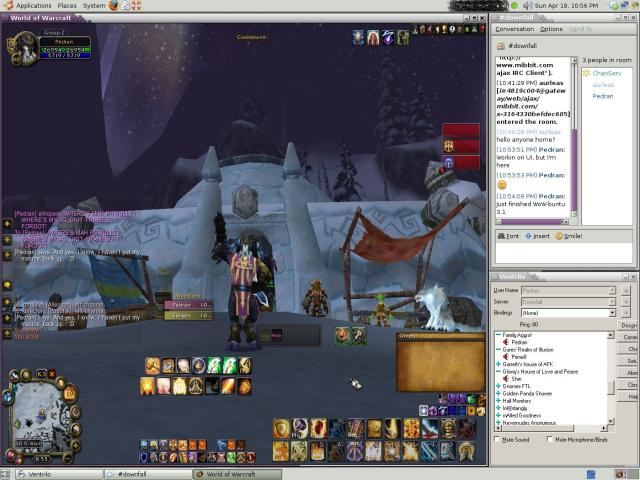 Wow-Buntu 3.1 ScreenShot: Where's Pitbull?
Table of Contents
Step 1: Planning and Setup
Step 2: Installing and Configuring Ubuntu
Step 3: Installing and Configuring Wine
Step 4: Installing and Configuring
Step 5: Installing and Configuring Sound / Ventrilo
(Under Future Construction because Garreth ran me through it to fast and I don’t remember what he made me do……)
Step 6: Macro’s and Recommended AddOns
(Under Future Construction because to be frank, I’m a Tankadin and don’t need that wide a variety of macro’s.)
Step 7: Troubleshooting and current known issues
(Under Future Construction. I am not a Linux/Ubuntu guru. I learned everything and setup my system over a period of three days.)


*Note* An update was released
Fjork — Sat, 06/06/2009 - 20:38*Note*
An update was released to Wine on June 6, 2009 which appears to crash (specifically) the OpenGL access in WINE.
As you might be able to guess this is not condusive to our player-base.
As a recommendation do NOT do this update.
Here is a 'potential' solution if you did, and please bear in mind that this IS only two potentials. Don't come bitchin to me if it goes "Boom" in your face.
A) If you have a nVidia type card, reinstall your drivers. That's it.
B) If you don't or that doesn't work, force WINE to revert:
Okay, if you accidentally
Fjork — Sat, 06/06/2009 - 21:17Okay, if you accidentally downloaded 1.1.23 here are your instructions: (Worked for me, ignore previous post)
You can embed images by using
garreth — Sun, 04/19/2009 - 21:19You can embed images by using that "Image Assist" button up thar.
*looks around ViolaWWW
Fjork — Mon, 04/20/2009 - 06:53*looks around ViolaWWW browswer*
I dun understand jur fancy worded-s.
lolz, but I'll try. :p