
Addons



WoW Ubuntu 3.1 Guide - Step 4: Installing and Configuring World of Warcraft
Fjork — Mon, 04/20/2009 - 08:16
Step 4: Installing and Configuring World of Warcraft
Open / Install Warcraft Folder in Wine
If you converted to Ubuntu on a dual-boot (didn’t format) you can actually open the World of Warcraft folder from your previous installation. I hope you did backed up all of your files and patches just in case.
If you didn’t convert, download the Install.exe for Warcraft from Blizzard (6.5 gb) and when it is done, Right-Click on it, and select “Run with Wine”.
Find some mirror sites (or archive) for the patches. Same thing for each patch. Right-Click “Run with Wine.”
*Note* If you have to install (as opposed to playing directly from installed w0w on your Windows install), you will not have a Config.WTF file, you will instead have a RunOnce.WTF file.
*Note* The Blizzard Updater will say “Please enable Javascript” while installing each patch. This is a known bug, but does not affect your install.
Locate your Config.WTF / RunOnce.WTF File
Application->Wine->Explore C:\ then “Program Files->World of Warcraft->WTF”
Right-Click and “Edit in Text Editor”
Make the following changes: (Edit the line that exists or create new)
SET ffxNetherWorld “0”
SET gxAPI “OpenGL”
SET ffxGlow “0”
SET gxWindow “1”’
SET gxRefresh “??” (This should be the Refresh Rate of your monitor used by Ubuntu.)
Choose One: (Not both)
SET gxMaximize “0” (Maximize Windowed Mode.)
SET gxResolution “1024x768” (1024x768 is the size it boots, regardless of monitor.)
If any of the previous lines do not exist, CREATE them. All three MUST be in your Config.WTF (RunOnce.WTF) for w0w to run properly (to start)
If this is your first time running WotLK (and all patches are complete), load the program, and exit the program. The RunOnce.WTF will have been replaced by the Config.WTF
Run World of Warcraft
Applications -> Wine -> Folders -> World of Warcraft -> Warcraft Launcher.exe
Exit World of Warcraft. Do NOTHING else. Just exit.
Re-Configure Wine and Warcraft to support each other
This step required for ATI video cards. Optional for a small fps boost on Nvidia video cards.
Open a Terminal: (Applications --> Accessories --> Terminal
Type command: regedit
If this does not work, or gives an error, Windows may need to renistalled on the system.
Find HKEY_CURRENT_USER\Software\Wine\
Highlight the wine folder in the left hand pane by left clicking on it. The icon should change to an open folder.
Click right on the wine folder and select [NEW] then [KEY].
Replace the text "New Key #1" with OpenGL (CaSe Sensitive).
Right click in the right hand pane and select [NEW] then [String Value].
Replace "New Value #1" with "DisabledExtensions" (CaSe sensitive).
Then double click anywhere on the line, a dialog box will open.
In the value field type "GL_ARB_vertex_buffer_object" (without the quotes).
If any of the previous steps are not performed, World of Warcraft will not function on ATI video cards. As soon as one bit of text hits your screen then you are in trouble.
This step required for ATI video cards. It is not recommended for Nvidia Video cards
Download the out of date Addon “ApplyToForeHead”. Place it in your Addons folder as you normally would.
Applications -> Wine -> Explore C:\
Program Files -> World of Warcraft -> Interface -> Addons
Run World of Warcraft
Applications -> Wine -> Folders -> World of Warcraft -> Warcraft Launcher.exe
ATI Video Cards:
Enable the Out of Date Addon ‘ApplyToForeHead’ that you previously downloaded and installed.
Login to play-test Warcraft by going inside and outside of buildings, getting in at least one fight, reading your quest-log, and texting in chat.
Everything should be functioning normally except your sound might suck.
If there are no errors, everything has been done perfectly! Go get the rest of your AddOns and install them, but don’t get rid of ‘AppyToForehead’.
Exit game.
WoW Ubuntu 3.1 Guide
Fjork — Sun, 04/19/2009 - 21:03
All suggestions are welcome as this will be an evolving document.
This will be a book page as Garreth, myself, Grasen, Aidin, and Delirium are done tearing it apart (and it will look nicer.)
All information provided has been referenced by the sources referenced through the document and as can be seen I can confirm that they work. These instructions are for Ubuntu 8.10 Intrepid, however they should work fine with Ubuntu 9.04 after release. I might play-test and find out.
Something rarely mentioned by people who support OpenSource is the large amount of End-User work (that’s you) it takes to make a Linux-based system function the way you want it to. If you do not consider yourself at least ‘moderately’ tech-savvy, take a long moment to consider your options before making the conversion to Ubuntu. (aka, if the following words mean nothing to you, Ubuntu isn’t for you unless you have guild/family/friends to help. ‘Mozilla’, ‘Torrent’, ‘manual install’, ‘drivers’, ‘dual-boot’, ‘regedit’, ‘refresh rate’. Not all of them, but if you’re looking at one of the seven than Ubuntu probably isn’t for you.)
*Note* Currently Blizzard does not support Mouse-Hardware properly while using OpenGL. In Windows when your system lags, your mouse does not. In Linux, your mouse will lag when your system lags. (aka: Wintergrasp, 25man Raiding, Malygos, etc) Please visit the Macro’s and Recommended AddOns page for more information and suggestions.
If you see something wrong, PLEASE post!
This is the Linux x86 and Linux x86_64 Drivers Released 03/24/2009
ATI has recently developed the Catalyst software support for Linux and it is very much appreciated but is not quite enough to work perfectly right off the bat.
The ATI Drivers only support video cards series 2400 and greater. If you have an ATI card prior to series 2400 DO NOT GO FURTHER.
This is WineHQ 's World of Warcraft page. Most of the information below will be coming directly from this page.
Please read this section for a quick overview before commending on ‘issues’ that might be unable to be corrected. (aka: mini-map is white while indoors, mouse-lag, etc)
http://www.wowwiki.com/Wine
Wowwiki's Wine Page
http://www.wowwiki.com/Wine_miscellaneous_info
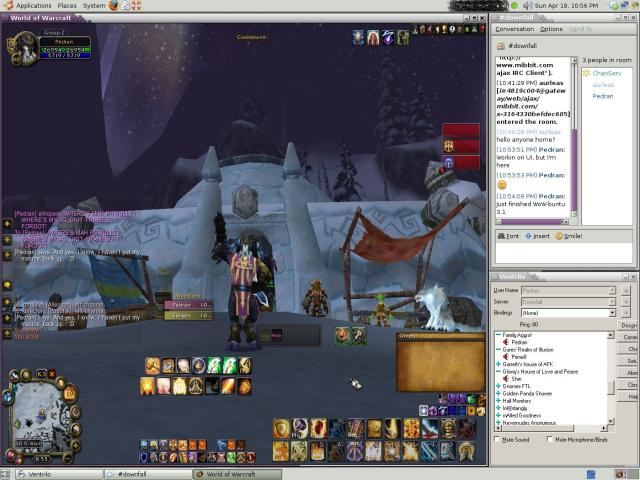 Wow-Buntu 3.1 ScreenShot: Where's Pitbull?
Table of Contents
Step 1: Planning and Setup
Step 2: Installing and Configuring Ubuntu
Step 3: Installing and Configuring Wine
Step 4: Installing and Configuring
Step 5: Installing and Configuring Sound / Ventrilo
(Under Future Construction because Garreth ran me through it to fast and I don’t remember what he made me do……)
Step 6: Macro’s and Recommended AddOns
(Under Future Construction because to be frank, I’m a Tankadin and don’t need that wide a variety of macro’s.)
Step 7: Troubleshooting and current known issues
(Under Future Construction. I am not a Linux/Ubuntu guru. I learned everything and setup my system over a period of three days.)

Downfall Guild Raid Addon Pack
garreth — Fri, 04/17/2009 - 01:41
Click here to download the Downfall Guild Raid Addon pack!
All these addons and more can be managed easily via the Curse Updater (www.curse.com/client). Check it out! Below is a list of the included addons and a quick summary of what they do:
Curse Client On Ubuntu Linux
garreth — Thu, 04/16/2009 - 16:43
I used WoWMatrix because they released an addon updater that ran native in Linux. With the death of WoWMatrix (which I do agree with to a point), I've decided to give Curse a shot. So far, it works beautifully in the latest version of Wine (1.1.19 for me).
Things to consider:
- When installing the Curse client, uncheck "Autostart" and "Install Curse Profiler"
- Many of your addons will be flagged as "Unidentified" if you used WoWmatrix. Simply go to the Unidentified tab and reinstall these, or go the "Find" tab, search for the addon and reinstall that way.
- If you installed WoW to its default folder (~/.wine/drive_c/Program Files/World of Warcraft) then Curse should be able to discover your WoW directory right away.
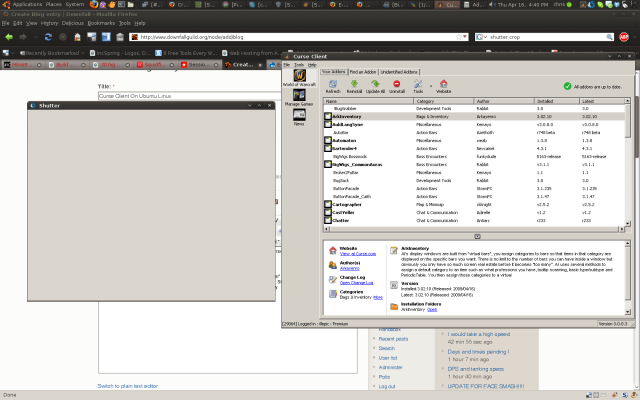 Curse Client Running in Ubuntu Linux: The Curse Client runs great under Wine in Linux
GridStatusAggro.lua FIX
garreth — Wed, 04/15/2009 - 13:42
This will fix the annoying Grid aggro error that is being thrown in 3.1. This a stop gap until Grid is released out to the major addon sites like WoWInterface and Curse.
- Download the attached zip file.
- Extract/overwrite this Grid folder to the folder: <World of Warcraft Directory>/Interface/Addons
Should be good to go for awhile until they update everything.
For those of you that care about what code changes got made:

Source: http://wow.curse.com/downloads/wow-addons/details/grid.aspx
What Addons' do you use? Why?
Fjork — Wed, 04/15/2009 - 13:31
This has been done a great many times I know, but to be frank, I don't touch my UI very often unless one of my friends beats me with the verbal sticks and yells "BAD PEDRAN!" (aka, not having PallyPower by accident one raid b/c kids turned it off)
So since I'm re-setting up and re-designing my UI next time I login, I figured I'd see what ya'll think I might be missing, or what you prefer instead of one that I have.
- BugGrabber - Not a UI thing, but there......
- DF Raid-Pack
- FuBar
- I usually put Dominos, SmartRes, a UI-Restart Button, RatingBuster, Omen, and Grid in my FuBar
- LuckyCharms
- Outfitter - Never used it before, but with Dual-Spec.......
- Bartender4 / Dominos - Personally I can't tell much difference between the two though Bartender is a little more 'tech'. I've always used Dominos, but I'll be getting Bartender4 b/c Dominos hasn't updated for 3.1 yet.
- QuestHelper- I'm a lazy SOB
- Talented - Ghli recently introduced me to this WONDERFUL addon for exporting wowhead talent-sets directly into wow. No more screwups for me.
- Pitbull - Yes, yes, I know. I hate myself too.
I'll also be using the following:
/console SET mouseSpeed "xx" (I usually play around till I find a good number, but it's been almost two years... I believe the safe zone is either 0-10 or 0-50) This is mouse-dependant since each mouse has it's own DPI.
/console SET cameraDistanceSmoothSpeed "14"
/console SET cameraDistanceMax "36"
How To Use FuriousRaid as a Raid Leader
garreth — Tue, 04/14/2009 - 23:38
Attached please find the latest user guide on how to use FuriousRaid. Downfall specific interjections will follow.


Recent comments
7 hours 17 min ago
4 weeks 1 day ago
7 weeks 1 day ago
7 weeks 2 days ago
9 weeks 1 day ago
9 weeks 1 day ago
9 weeks 1 day ago
10 weeks 2 days ago
11 weeks 3 days ago
13 weeks 17 hours ago