
Tools

WoW Ubuntu 3.1 Guide - Step 2: Installing and Configuring Ubuntu
Fjork — Mon, 04/20/2009 - 08:10
Step 2: Installing and Configuring Ubuntu
Install Ubuntu
You will be asked for a username and password. This will be the "root" user and your user. (sudo = root when you are typing in terminal mode)
*Note* You should create a secondary account for w0w playing as there are no system protections when you are accessing interwebz programs such as video games, online poker, etc through the root login. This can be done from the Virtual Terminal or the gui. This should be done after you have everything configured and have play-tested World of Warcraft to your satisfaction. However, unfortunately, you’ll then have to configure and play-test AGAIN for the new user.
From Gui, Systems->Administrator-> User Groups
From Virtual Terminal (Ctrl + Alt + F1)
sudo adduser username
Follow prompts.
From the Gui, you will have to select “root” (which is greyed out) and click ‘Unlock’ before it will allow you to Add a user. Each user must be configured separately.
Update Ubuntu
Currently for 8.10 there are 289 Updates to have installed before you start configuring your machine. DO THIS FIRST.
You will need to be connected to the internet to do this. Picture your “Start Menu” as being on the top instead of the bottom of the page. See the Network Button on the top-right? Configure it.
Check Mozilla FireFox to make sure you have Internet.
If you do, there should be a red and white arrow pointed down next to your network status icon. Click it.
Install all updates.
This can also be done through: System -> Administration -> Update Manager
Reboot system.
How do I determine my Video Card make and model?
Open a Terminal.
Applications -> -> Terminal
Type the following:
lspci | grep VGA
*Note* If the grep returns two video cards, you need to determine which one is your on-board video card. Sometimes if the cards are from the same manufacturer, they will conflict and you will need to turn off your on-board card in the BIOS. If you are not sure how to do that, either do some forum-crawling or send me a PM on the site.
Installing ATI Video Card Drivers
System -> Administration -> Hardware drivers
Select “ATI Driver” Should be listed as Proprietary and approved by Ubuntu.
Please ensure the Driver you have selected is the “Catalyst 9.3”. If Linux does not support you with this driver, it should be downloaded to your desktop and manually installed.
The ATI Drivers only support video cards series 2400 and greater.
Select “Enable this Driver”.
Reboot system.
*Note* Many times the graphic-rendering is choppy and can lag using the Default ATI Proprietary Drivers submitted through Ubuntu because they do not install properly. If this is the case, please follow the next instructions (I had to do this on my ATI Radeon Mobility 3450).
Source: http://wiki.cchtml.com/index.php/Ubuntu_Intrepid_Installation_Guide
*Note* If you are using a 64-bit system, please follow the instructions on the website directly, but read the entire site before beginning. There is more end-user configuration required.
Text in green should be entered in Terminal.
Open a Terminal: (Applications -> -> Terminal)
1. Install the necessary programs
sudo apt-get install build-essential cdbs fakeroot dh-make debhelper debconf libstdc++5 dkms
Download page: Catalyst 9.4. This package contains both the 32-bit and 64-bit driver.
Ensure your terminal is set for the folder the package downloaded in. (aka: $ cd Desktop)
2. Create .deb packages.
sudo sh ati-driver-installer-9.4-x86.x86_64.run –buildpkg Ubuntu/intrepid
3. Install .debs.
sudo dpkg -i xorg-driver-fglrx_8.602-0ubuntu1_i386.deb fglrx-kernel-source_8.602-0ubuntu1_i386.deb fglrx-amdcccle_8.602-0ubuntu1_i386.deb
4. Finish the Installation and Configure
sudo gedit /etc/X11/xorg.conf
A window will pop-up with your .conf file. Locate the “Device” section.
If the following line is not in the “Device” Section, add it.
Driver "fglrx"
Save file and exit. Return to your Terminal.
sudo aticonfig –initial –f
Exit terminal. Reboot computer.
Installing Nvidia Video Card Drivers
System -> Administration -> Hardware drivers
Select “Nvidia Driver 180” Should be listed as Proprietary and approved by Ubuntu.
The Nvidia Drivers only support video cards
Roughly GeForce 5100 and greater.
Roughly Quadro NVS 290 and greater.
Check here if you are not sure if your care is supported
Select “Enable this Driver”.
Reboot system.
WoW Ubuntu 3.1 Guide - Step 1: Planning and Setup
Fjork — Mon, 04/20/2009 - 08:08
Step 1: Planning and Setup
Lower ALL of your World of Warcraft settings to minimum. Archive all AddOns then remove them. Archive all the Patches you have, we might need them. (The usefulness of this comes in later.)
Backup ALL files to burned CD and/or Flash Drive. We are going to attempt to keep all of your Windows Files (including Warcraft), but life isn’t always fair, is it?
Get your copy of Ubuntu. You can download it (along with a iso burner program) straight from http://www.ubuntu.com or if you prefer, you can purchase a cd to be sent to you for a few bucks (the cost of the cd. The software is free.)
Make a copy of your Ubuntu install cd. (Mine was picked up by my toddler and shoved into the fireplace grating. The backup is free (with an “Image Burner”), and good to have.
https://help.ubuntu.com/community/BurningIsoHowto
Read this if you have already gotten lost:
https://help.ubuntu.com/community/SwitchingToUbuntu/FromWindows
Don’t read to long, or you’ll stay lost. I’m walking you through.
BootFromCD
https://help.ubuntu.com/community/BootFromCD
Here we are actually going to be booting Ubuntu from the CD. You have the option of exploring Ubuntu, or installing it. We are going to choose install.
Migration Assistant (informational)
https://help.ubuntu.com/community/SwitchingToUbuntu/FromWindows/TransferringFilesAndSettings
https://help.ubuntu.com/community/MountingWindowsPartitions
You can do that, but I’ll tell you now it’s possible to setup a dual-boot, in which case all your Windows files will be preserved and Ubuntu will usually show them all in your files.
WoW Ubuntu 3.1 Guide
Fjork — Sun, 04/19/2009 - 21:03
All suggestions are welcome as this will be an evolving document.
This will be a book page as Garreth, myself, Grasen, Aidin, and Delirium are done tearing it apart (and it will look nicer.)
All information provided has been referenced by the sources referenced through the document and as can be seen I can confirm that they work. These instructions are for Ubuntu 8.10 Intrepid, however they should work fine with Ubuntu 9.04 after release. I might play-test and find out.
Something rarely mentioned by people who support OpenSource is the large amount of End-User work (that’s you) it takes to make a Linux-based system function the way you want it to. If you do not consider yourself at least ‘moderately’ tech-savvy, take a long moment to consider your options before making the conversion to Ubuntu. (aka, if the following words mean nothing to you, Ubuntu isn’t for you unless you have guild/family/friends to help. ‘Mozilla’, ‘Torrent’, ‘manual install’, ‘drivers’, ‘dual-boot’, ‘regedit’, ‘refresh rate’. Not all of them, but if you’re looking at one of the seven than Ubuntu probably isn’t for you.)
*Note* Currently Blizzard does not support Mouse-Hardware properly while using OpenGL. In Windows when your system lags, your mouse does not. In Linux, your mouse will lag when your system lags. (aka: Wintergrasp, 25man Raiding, Malygos, etc) Please visit the Macro’s and Recommended AddOns page for more information and suggestions.
If you see something wrong, PLEASE post!
This is the Linux x86 and Linux x86_64 Drivers Released 03/24/2009
ATI has recently developed the Catalyst software support for Linux and it is very much appreciated but is not quite enough to work perfectly right off the bat.
The ATI Drivers only support video cards series 2400 and greater. If you have an ATI card prior to series 2400 DO NOT GO FURTHER.
This is WineHQ 's World of Warcraft page. Most of the information below will be coming directly from this page.
Please read this section for a quick overview before commending on ‘issues’ that might be unable to be corrected. (aka: mini-map is white while indoors, mouse-lag, etc)
http://www.wowwiki.com/Wine
Wowwiki's Wine Page
http://www.wowwiki.com/Wine_miscellaneous_info
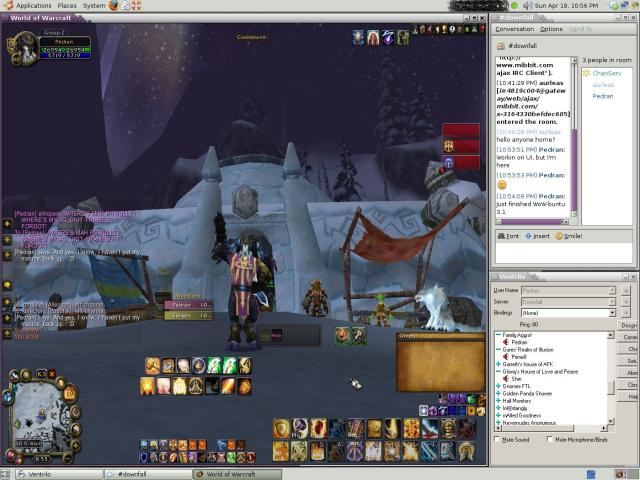 Wow-Buntu 3.1 ScreenShot: Where's Pitbull?
Table of Contents
Step 1: Planning and Setup
Step 2: Installing and Configuring Ubuntu
Step 3: Installing and Configuring Wine
Step 4: Installing and Configuring
Step 5: Installing and Configuring Sound / Ventrilo
(Under Future Construction because Garreth ran me through it to fast and I don’t remember what he made me do……)
Step 6: Macro’s and Recommended AddOns
(Under Future Construction because to be frank, I’m a Tankadin and don’t need that wide a variety of macro’s.)
Step 7: Troubleshooting and current known issues
(Under Future Construction. I am not a Linux/Ubuntu guru. I learned everything and setup my system over a period of three days.)


Vent Normalization
Ardea — Tue, 02/03/2009 - 18:53
If you are on Vent... You should do this!
Vent Normalization makes every bodies voice the exact same volume. In essence, you won't blow your ear's out or have difficulty hearing people.
--------------------------------------------------------------------------------
Here's how:
- Go to Setup
- Enable Direct Sound
- Select the SFX Button
- Select Compressor and click Add.
- Under Compressor Properties use the following settings
- Gain = Adjust for how loud you want people to be. (I use 15)
- Attack = 0.01
- Release = Around 500
- Threshold = Around -30
- Ratio = 100
- Pre delay = 4.0
--------------------------------------------------------------------------------
What the settings do - Copied and pasted from page 8
Gain
How much volume you feed into the compressor. Not really relevant unless everyone is too quiet, then you can turn this up a little; turning it up too much will sound EXTREMELY *%*%ty.
Attack
How fast volume change will happen. example: setting this to 500 means that any-
thing coming in will only be dropped in volume after a half a second. for vent this should
be set as low as possible.
Release
how fast the compressor stops changing things. not really that relevant with vent, setting it around 500 is good for voice material.
Threshold
This sets the point where we actually start changing what?s coming in. Whereas 0 is the absolute loudest you can have for an input, -60 is super quiet. Average users will probably come in somewhere around -25 to -15, with the occaisional few being really quiet, which is why I have this set so low.
Ratio
How much any sound below the set threshold gets compressed and/or modified in the volume department.
If you still want to hear SOME volume variation then set this lower (2-4)... the higher you set it the closer in volume everyone will be.
Pre delay
Mostly just deals with processing; with computer and digital processors they can look ahead a few milliseconds to see what needs to be dropped in volume or changed before it actually comes through the speakers. Highest is ideal.

coming soon to a public wall near you
moar of my shit: http://flickr.com/photos/lemonpolice/


What do you think of this Rig? Pls Look and Input :D
Dragon — Sat, 11/08/2008 - 12:03
http://www.samsclub.com/shopping/navigate.do?dest=5&item=403256&pCatg=58...
They are selling this rig at the SAMs Club near my house and I wanted to know what people much more knowledgable in the subject than myself thought about it.


Recent comments
7 hours 17 min ago
4 weeks 1 day ago
7 weeks 1 day ago
7 weeks 2 days ago
9 weeks 1 day ago
9 weeks 1 day ago
9 weeks 1 day ago
10 weeks 2 days ago
11 weeks 3 days ago
13 weeks 17 hours ago