
Tools

The $600-ish WoW Computer
garreth — Sun, 06/29/2008 - 22:41
So, this has been a project of mine since I found out that you can run WoW in Linux at really great performance. It kills me whenever I hear from someone that their computers are crashing or that they're getting 1 frame-per-second (guilty) in raid. I kinda always wished that we had a quick and easy "drop ship" solution that people could just order and - BAM - WoW runs great.
The lowest cost I've been able to get this down to is about $600 (including shipping costs). The main parts from Newegg are here: http://secure.newegg.com/WishList/PublicWishDetail.aspx?WishListNumber=1...
There are about $45 in mail-in-rebates as well. The case and power supply are here: http://www.amazon.com/MFBK400-Micro-V400PSU-2-5-25-ULT33114/dp/B000FIS91...
By running Ubuntu Linux (http://www.ubuntu.com/products/WhatIsUbuntu/desktopedition), we save about $200. Of course, Linux requires a little bit of elbow-grease to get running, but all the parts are compatible.
I've ordered the first iteration of this system for myself and will be testing how it all goes this week. If people are interested, let me know.
FIOS and WoW Performance
garreth — Mon, 06/23/2008 - 14:44
I'm considering switching to FIOS. I'm at the point in WoW where the only things I can possibly do to improve my performance are 1)hardware upgrades and 2) Internet upgrades.
Currently, on Comcast, I'm at 300+ latency during the evenings. I'd like to get this as low as possible and was wondering if anyone has any experience with Verizon FIOS. Hit me with some numbers like max download rate and, more importantly, WoW latency.

Click Here to Download Trillian from download.com
Download the application from the link above.
Once installation is complete follow these steps to set up your IRC connection.
- Click on Trillian > Connections > Manage My Connections
- Cllick Add a New Connection - Protocal will be IRC
- Server Alias is what ever you want to call this...for me it's Downfall
- IRC Line should read: irc.freenode.net
- Nickname: Your IRC Name
- User Name: Blank
- User Info: Blank
- Close to Save.
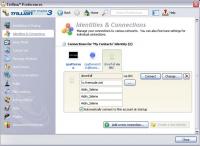 Trillian Setup
Your setup of Trillian is now complete.
In order to connect to IRC each time you will need to follow these steps:
- Go to your buddy list and right click on the white bubble.
- Chose Join Channel
- Enter #Downfall
 Trillian Connect
You are now connected!!
http://www.mmorpgs.com/Kunzite/guide/guide.php?pageid=19
Read it and learn it. Some great tips in here for you guys on how to pick up some extra gold quickly and well within the ToS.
Garreth's New Box
garreth — Mon, 05/26/2008 - 01:23
I'm going to be building a new machine in the next few weeks. The following are the pieces of hardware I'm looking to pick up:
http://secure.newegg.com/NewVersion/wishlist/PublicWishDetail.asp?WishLi...
Could our more technically-inclined members go over that list and hit me with some feedback? I generally buy a generation behind to pick up a better deal.
I've been playing wow on an athlon64 3400+ with an Nvidia 6800GT since day one and I think it's time to finally upgrade ;)
Edit: updated with new link to the wishlist
Ubuntu WoW: The First Week
garreth — Sun, 05/11/2008 - 23:41
Well, I finally moved over to a completely Linux laptop. So far, it's pretty freaking sweet. Once you get used to the "linux" way and get a little comfy with the command line, there's some incredible free and quality software out there. Here are some screenshots of WoW running in windowed mode:
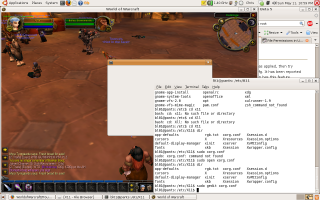 Ubuntu WoW 1
The laptop has a pretty crappy video card, so I hope that I see larger performance on my desktop when I convert it over soon. I also found WoW UI Updater (http://wuu.vagabonds.info/menu.php) which I'm running using a Python interpreter natively in Linux. So far, so good :)
Here's so more screenies:
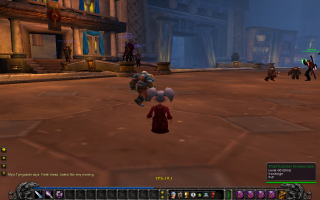 Ubuntu WoW 2
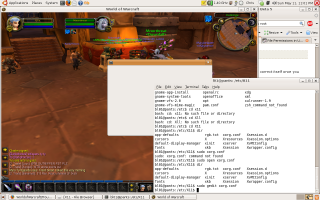 Ubuntu WoW 3
New Nvidia beta drivers, and a fix for WoW in SLI mode
garreth — Thu, 05/08/2008 - 14:33
The following is post off of Wowinsider.com (click the links!) and addresses an issue a lot of us have had with WoW performance recently. Try these beta drivers and then make sure you do the following:
From Nvidia themselves:
GeForce 6800/6600 GT: Slow performance with World of Warcraft in SLI mode. This is not an NVIDIA bug, but instead the result of a recent patch for World of Warcraft to reduce mouse lag on slower computers by synchronizing the GPU(s). This change is unnecessary for NVIDIA users, and particularly for users with SLI configurations.
For optimal performance when playing World of Warcraft in SLI mode:
* Disable vertical sync within the World of Warcraft in-game video options.
* Enable hardware mouse acceleration and disable smooth mouse within the World of Warcraft in-game video options.
Read on for more.
New Nvidia beta drivers, and a fix for WoW in SLI mode -
Filed under: News items, Hardware
Moving to Ubuntu Linux
garreth — Thu, 05/01/2008 - 09:31
I've been screwing around with Linux on and off again for the last three years and I think it's time I take the plunge with Ubuntu 8 and it's braindead-easy installer. There are really only TWO things that completely required for me to switch 100%:
- Will it run full Photoshop CS3?
- Will it run WoW (and some derivation of WoWAceUpdater)?
Mistrbook, I know that you're a linux geek and you've at least had wow and an addon updater running for the last few months. Hit me with some feedback.



Recent comments
7 hours 17 min ago
4 weeks 1 day ago
7 weeks 1 day ago
7 weeks 2 days ago
9 weeks 1 day ago
9 weeks 1 day ago
9 weeks 1 day ago
10 weeks 2 days ago
11 weeks 3 days ago
13 weeks 17 hours ago